
Going live on a new ERP does not mean the legacy system can be switched off immediately. Historical transactions, tax records, customer disputes, warranty claims, audit requests, regulatory retention and unresolved integrations may still depend on it. Decommissioning without a controlled exit plan can create compliance gaps, retrieval delays and unexpected support costs.
ERP decommissioning is a business, records-management and technology decision. The objective is to preserve the information and evidence the organisation must retain while removing unnecessary infrastructure, licenses, access paths and operational dependencies.
Why legacy ERP retirement is often delayed
Common reasons include unclear data-retention rules, incomplete migration, custom reports that have not been replaced, unresolved interfaces, audit requirements, open disputes, uncertainty over historical calculations and a lack of ownership for archive access. In many organisations, the legacy platform remains online because nobody has confirmed what information must be available, for how long and in what form.
Do not set a retirement date before the business has approved the archive scope and tested retrieval. A backup alone is not an archive strategy: it may preserve files but not provide searchable records, business context or a practical way to answer an audit request.
Decide what to migrate, archive or retire
| Disposition | Use when | Control required |
|---|---|---|
| Migrate to the new ERP | Data is needed for current operations or active processes | Mapping, validation, reconciliation and business acceptance |
| Archive in a controlled repository | Historical information must remain accessible but is not needed for daily processing | Retention schedule, search, access control, integrity and retrieval testing |
| Retire / dispose | Data and systems are no longer required and disposal is permitted | Approved disposal, legal-hold check and evidence of destruction |
Make this decision at the data-object and record-class level. A business may migrate active customers and open transactions, archive closed invoices and purchase orders, and dispose of temporary data that has no continuing business or legal purpose. The exact treatment depends on jurisdiction, industry and company policy.
Build a retention and legal-hold register
Work with legal, tax, finance, compliance, privacy and records-management owners to identify the retention obligations that apply to each record category. Do not assume one retention period applies to every country, tax record, employee record or customer transaction. Record the source of the requirement, responsible owner, start event, retention period, disposal rule and any legal-hold exception.
Where litigation, investigation, tax audit or other legal hold applies, suspend routine disposal for the relevant records and preserve the required evidence. The archive must support controlled access and defensible retrieval. This article is an operational planning guide, not legal advice; obtain jurisdiction-specific advice before setting retention or destruction rules.
Choose an archive approach
Read-only access to the legacy ERP
This may be suitable for a short transition when the application remains supported and the organization can maintain secure infrastructure, licenses and access controls. Risks include ongoing vendor costs, unsupported versions, specialist skill dependency and the temptation to keep using the old system for new transactions.
Structured data archive
A structured archive extracts agreed data objects, relationships and supporting documents into a controlled repository. It can reduce the need to operate the old application, but requires data mapping, metadata, search design, integrity controls and a practical retrieval interface.
Third-party archive or records platform
A specialist platform may provide retention policies, legal holds, search, access logging and export functions. Evaluate its security, data location, contract terms, portability, integration and long-term vendor viability. Confirm that the archive can preserve context and relationships, not just store flat files.
Design for retrieval, not just storage
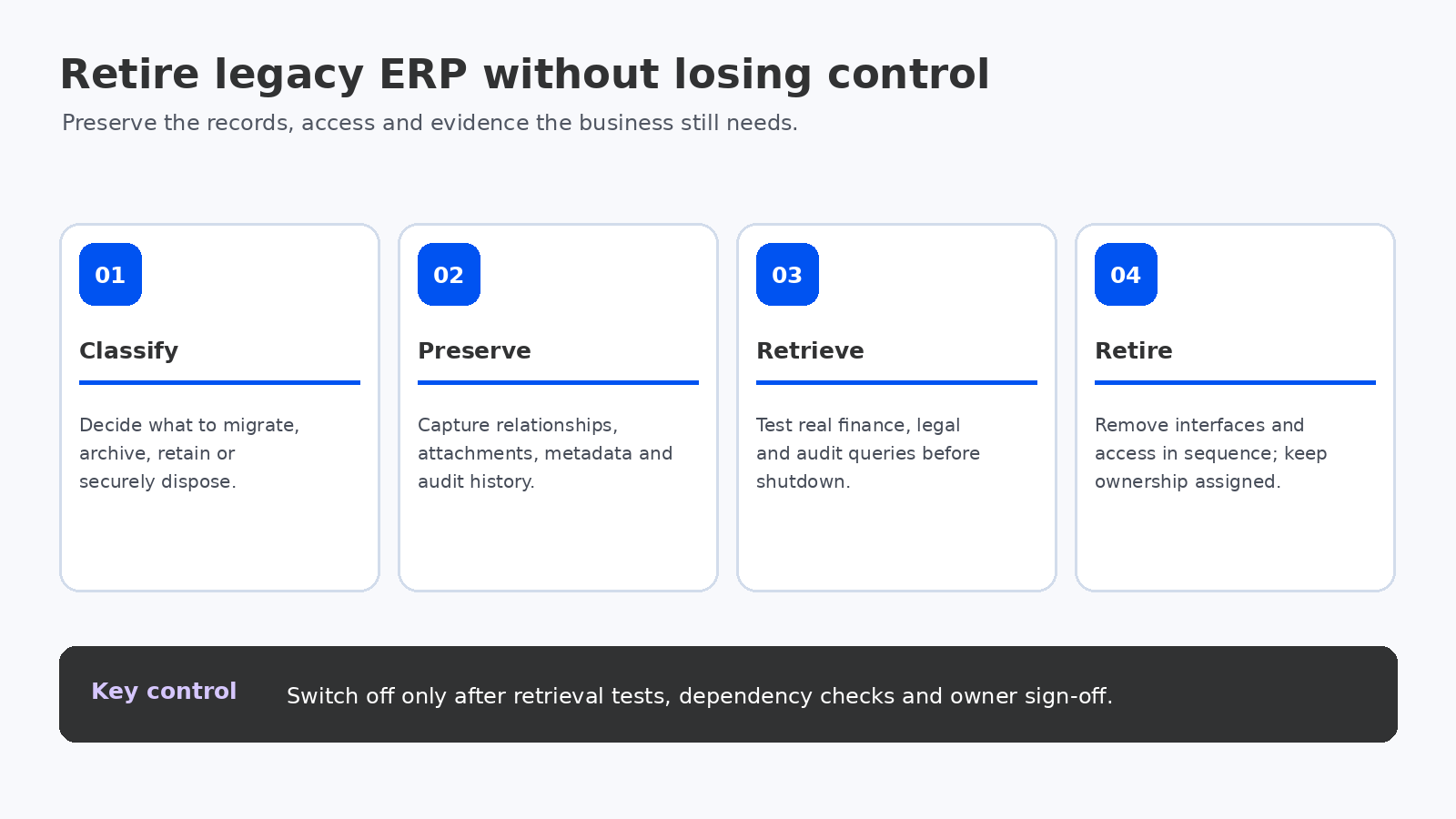
Test real retrieval scenarios before approving decommissioning. Examples include finding a customer invoice by number, reconstructing a purchase order and receipt, tracing a journal to supporting evidence, retrieving a tax record for a defined period and producing a complete transaction history for an audit request.
Preserve the identifiers and relationships users need: legal entity, account, document number, transaction date, currency, item, site, tax code, approval history, attachment and source-system reference. Document how users search, request access, export evidence and escalate a failed retrieval.
Security, integrity and access controls
- Apply role-based access and least privilege to archive users.
- Log searches, views, exports, administrative changes and disposal actions where appropriate.
- Protect data in transit and at rest according to organizational security requirements.
- Preserve timestamps, source identifiers, attachments and relevant audit metadata.
- Define backup, recovery, integrity validation and periodic restore tests.
- Remove legacy user accounts and integration credentials when they are no longer required.
Identify hidden dependencies before shutdown
Inventory scheduled reports, spreadsheets, data warehouse feeds, tax tools, bank interfaces, EDI connections, document repositories, custom applications and downstream systems that read from the legacy ERP. Confirm whether each dependency has been replaced, redirected, archived or retired. Monitor traffic and job execution during a controlled shutdown window so that undocumented consumers are discovered before the environment is permanently removed.
Legacy decommissioning runbook
- Approve the system and data disposition register.
- Confirm retention schedules, legal holds and disposal authority.
- Extract data, documents, metadata and audit evidence.
- Validate completeness and integrity against source control totals.
- Test business and audit retrieval scenarios with representative users.
- Reconcile dependencies and stop new transactions in the legacy system.
- Revoke access and credentials in a controlled sequence.
- Retire infrastructure, licenses and support only after formal approval.
- Assign archive ownership, monitoring, periodic access reviews and disposal dates.
Cost and ownership after retirement
Compare the cost of retaining the legacy application with the cost of extracting and maintaining an archive. Include infrastructure, licenses, database support, specialist contractors, security patching, backup, audit retrieval, archive subscription, data export and future vendor exit costs. A low-cost archive that cannot answer an audit request is not a viable replacement.
Name a business owner and a technical owner. Define who approves access, responds to retrieval requests, manages legal holds, reviews retention schedules and authorizes eventual disposal. Ownership should survive the original ERP project team.
Questions to ask before switching off the old ERP
- Which records must remain accessible, and under which jurisdictional rules?
- Are legal holds and open disputes identified?
- Can users retrieve transactions and supporting documents without the legacy application?
- Have all interfaces, reports and scheduled jobs been inventoried?
- Are access logs, integrity controls and recovery procedures tested?
- Who owns the archive and who approves final disposal?
Final recommendation
Make legacy decommissioning a formal workstream in the ERP programme, not an afterthought after go-live. Agree data dispositions early, preserve searchable evidence, test retrieval with business users and retire dependencies in a controlled sequence. The system should be switched off only when the organization can demonstrate that operational, audit and retention needs are still met.
For migration planning, read the ERP migration guide and ERP data migration checklist.
Define the archive service level
Historical data is only useful if authorized people can retrieve it when needed. Define the expected retrieval time for common requests, the process for urgent audit or legal requests, supported export formats and who approves access to sensitive records. A finance user may need read-only access to invoices, while a legal request may require a controlled export with a documented chain of custody.
Test the archive using realistic queries, not just a technical restore. Confirm that users can locate records using identifiers they actually know—document number, customer, supplier, legal entity, date range, amount or source reference. Verify that attachments and relationships remain available and that search results can be reconciled to source-system reports.
Plan the shutdown sequence
Decommissioning should be staged. First stop or redirect new transactions. Then disable scheduled jobs and integrations in a controlled order, preserve required logs and extracts, revoke service credentials, remove user access, and monitor for unexpected dependencies. Keep the environment recoverable until the agreed validation and approval gates have passed.
Document the exact shutdown sequence, rollback conditions, responsible administrators and evidence to retain. If a critical dependency is discovered, the team should know how to restore the service or provide an approved workaround without compromising archive integrity.
Assess privacy and data minimization
Retaining everything forever increases security exposure and can conflict with data-minimization obligations. Work with privacy and legal owners to determine whether personal data should be deleted, masked, restricted or retained under a documented purpose. Apply access restrictions to archived employee, customer and supplier information and review them periodically.
Where the archive is hosted by a third party, review data location, subprocessors, encryption, access logging, breach notification, portability, deletion certification and exit assistance. The contract should explain how data can be exported if the archive provider is replaced.
Decommissioning acceptance criteria
- Every data class has an approved migrate, archive or dispose decision.
- Retention rules, legal holds and disposal authority are documented.
- Archive completeness is checked against source record counts and control totals.
- Representative business and audit retrieval tests have passed.
- Security roles, logs, backup and recovery controls are verified.
- Interfaces, reports, scheduled jobs and credentials have been inventoried and addressed.
- Business, IT, legal/compliance and records owners have signed off the retirement.
For the wider transition, the Microsoft guidance on transition to support operations highlights ongoing change control and the need to define responsibilities after deployment. The same ownership principle applies to archive services: someone must remain accountable after the implementation project closes.
Related reading: ERP data security best practices and ERP disaster recovery and business continuity.
