

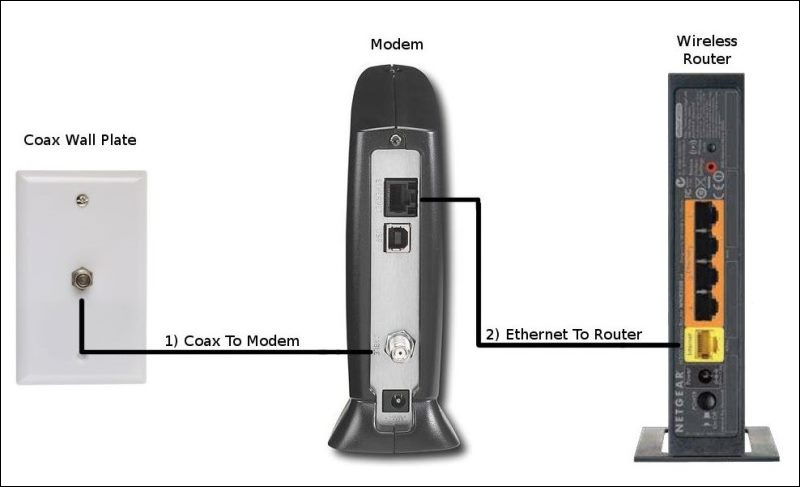
If you have cable internet, you may see a modem, a router, or one device that combines both. They perform different jobs. The cable modem connects your home or office network to the cable provider’s access network, while the router manages traffic between your local network and other networks. A combined device is commonly called a gateway.
This distinction matters when you troubleshoot slow internet, replace equipment, choose a modem, or decide whether you need a separate router. It also matters because not every type of internet service uses a cable modem. Fiber, DSL, fixed wireless, and satellite services can use different customer-premises equipment.
Quick Difference: Modem vs. Router
| Device | Main job | Connects to |
|---|---|---|
| Cable modem | Connects your network to a cable ISP’s access network | Cable/coax service and Ethernet |
| Router | Routes traffic between your local network and other networks and shares the connection with devices | Modem/gateway and local devices |
| Wi-Fi router | Router plus wireless networking for compatible devices | Modem/gateway and Wi-Fi/Ethernet clients |
| Gateway | Combines modem and routing functions in one device | ISP connection and local network |
What Is a Cable Modem?
A cable modem is the equipment that provides the connection between a cable broadband service and your local network. It communicates with the provider’s cable access infrastructure using the relevant DOCSIS technology and normally presents an Ethernet connection to the device or router on your side.
Modern cable networks continue to evolve. CableLabs identifies DOCSIS 3.1 as an important current cable-broadband standard and describes DOCSIS 4.0 as the next-generation technology for multi-gigabit services over hybrid fiber-coax networks. A modem’s theoretical or supported capacity does not mean that speed is automatically available on your internet plan. The ISP, service tier, network configuration, and modem compatibility all matter.
What Is a Router?
A router connects different networks and forwards IP traffic toward its destination. In a home or small office, the router normally creates the local network used by computers, phones, TVs, printers, cameras, and other devices. It can provide wired Ethernet connections and, when it includes Wi-Fi, wireless access.
Routers can also provide functions such as DHCP, firewalling, network address translation, guest networking, parental controls, VPN features, and traffic-management options. The exact features depend on the model and software.
In simple terms, the modem provides the link to the ISP, while the router organizes and shares that connection with the devices on your local network. Cisco describes the same basic distinction: a modem connects a network to internet access through the ISP, while a router connects devices within a network and forwards traffic between networks.
What Is a Modem-Router Gateway?
Many ISPs provide a single device that combines modem, router, Ethernet switch, Wi-Fi, and security functions. This is convenient because there is less equipment to install and manage.
The trade-off is control. If you want a different Wi-Fi system, advanced routing features, or more control over your local network, you may prefer a compatible modem with your own router, where the ISP allows that setup. Some gateways can also be configured in bridge or passthrough modes, but the exact behavior varies by ISP and device.
How the Connection Works
For a typical cable internet setup, the path looks like this:
- Internet service provider provides the broadband connection through its access network.
- Cable modem communicates with the cable network and provides the local Ethernet handoff.
- Router manages the local network and routes traffic between the LAN and the upstream network.
- Devices connect to the router through Ethernet or Wi-Fi.
If the modem and router are combined, the first two equipment roles are handled by the same physical unit.
Do You Need Both a Modem and a Router?
Not always. If your ISP supplies a gateway, you may already have both functions in one device. If you buy separate equipment, a cable modem and router can work together when the modem is supported by your ISP and the router is configured correctly.
You also do not necessarily need a traditional cable modem at all. Fiber internet typically terminates at an optical network terminal or similar fiber equipment, while other access technologies use their own customer-premises equipment. Always identify the access technology before buying replacement hardware.
Cable Modem vs. Router: Common Misconceptions
- A faster router cannot automatically increase your ISP plan speed. It can remove a local networking bottleneck, but it cannot create bandwidth your service does not provide.
- A modem does not normally provide full home-network management by itself. Some cable devices include routing functions, which is why gateways can cause confusion.
- Wi-Fi speed is not the same as internet speed. Wireless performance depends on the client device, Wi-Fi standard, signal conditions, channel use, network configuration, and router hardware.
- More antennas do not automatically mean better performance. Evaluate the complete device and your environment instead of relying on antenna count.
- A modem must be compatible with the ISP and service. Check the provider’s approved-device information and supported technology before purchasing.
How to Choose Replacement Equipment
If You Are Replacing a Cable Modem
- Confirm that your ISP supports the exact modem model.
- Check the supported DOCSIS version and service tier.
- Confirm whether your plan requires specific features such as voice support.
- Check Ethernet port capability and any ISP-specific activation requirements.
- Consider expected future service upgrades, but do not pay for capabilities your network cannot use.
If You Are Replacing a Router
- Check whether you need Wi-Fi 6, Wi-Fi 7, or another current wireless standard based on your devices and environment.
- Count the Ethernet ports and check their speeds.
- Consider coverage, wired backhaul, mesh support, and placement.
- Review security updates and the manufacturer’s support policy.
- Look for the routing and management features your household or business actually needs.
Troubleshooting: Which Device Should You Check?
| Problem | What to investigate first |
|---|---|
| No connection from the ISP | Modem or gateway status, cable connection, ISP outage, and activation |
| Internet works near the modem but Wi-Fi is poor | Router placement, Wi-Fi configuration, interference, and client capability |
| Only one device has problems | That device’s network settings, adapter, software, or signal |
| Wired devices are slow too | Modem/gateway status, Ethernet link, router configuration, and ISP service |
| Internet disconnects repeatedly | Modem logs/status, signal quality where available, cabling, router behavior, and ISP support |
What Changed Since Older Modem and Router Guides?
Older explanations often assumed that every home used a separate cable modem connected to a simple wireless router. Modern equipment is more integrated. ISPs commonly provide gateways, Wi-Fi systems can use mesh architectures, and cable technology is moving from established DOCSIS 3.1 deployments toward DOCSIS 4.0 capabilities.
CableLabs’ February 2026 technology update notes that DOCSIS 3.1 and 3.1+ cable modems are now widely used in HFC networks and that DOCSIS 4.0 interoperability has progressed significantly. These developments make it even more important to check the technology and service requirements rather than choosing equipment based only on an old speed chart.
Bottom Line
The simplest way to remember the difference is: the modem connects to the ISP’s access network, and the router manages traffic on your local network and between networks. A gateway can combine those functions into one device.
When replacing equipment, first identify your internet access technology and service plan. Then check ISP compatibility, required features, network performance, security support, and whether you want a single gateway or separate modem and router. This approach is more reliable than choosing equipment based on advertised speed alone.
Sources: Cisco: How Does a Router Work? and CableLabs: DOCSIS 4.0 Technology.
