
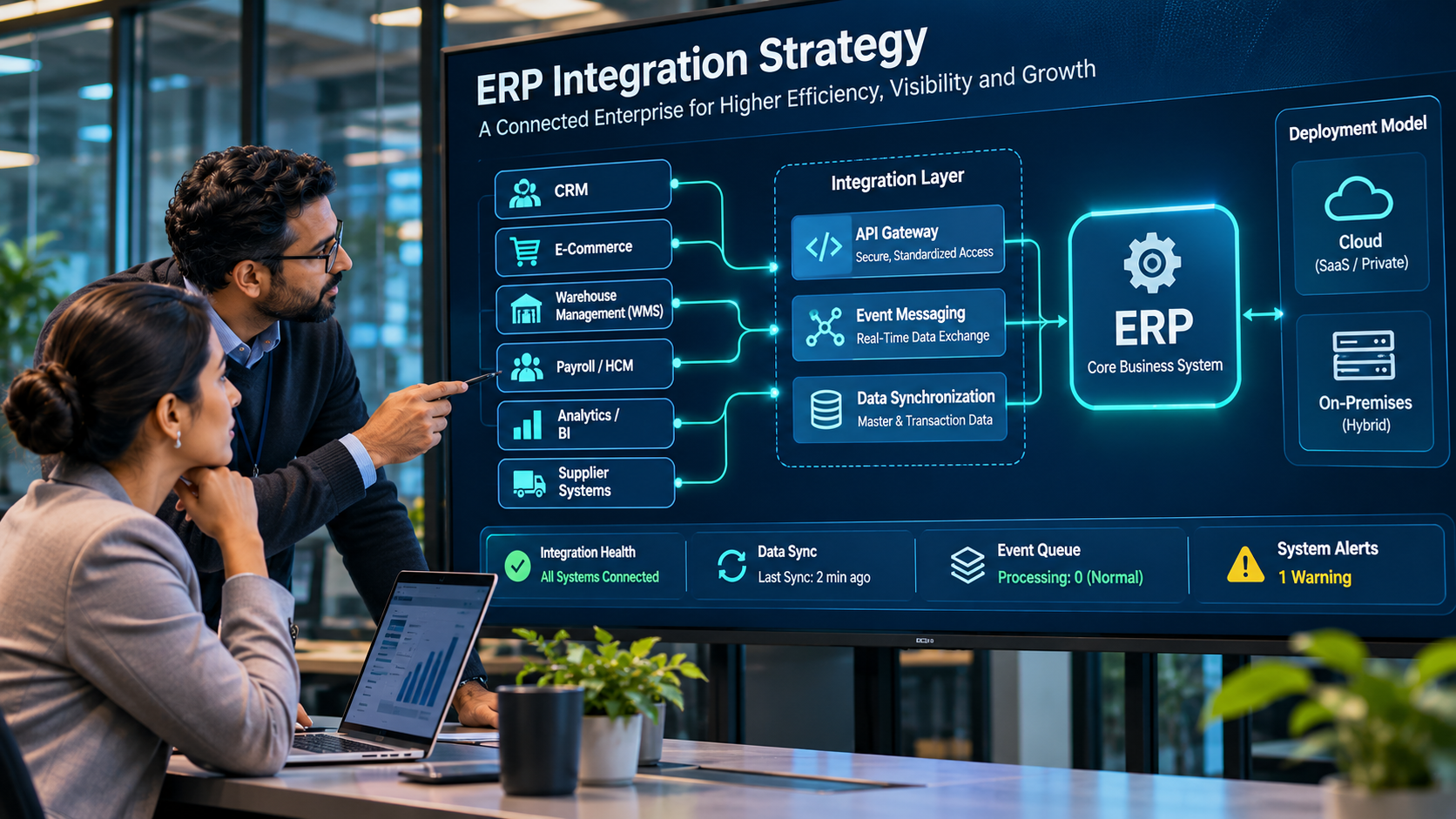
ERP integration connects finance and operations with the applications that manage customer relationships, ecommerce, warehouses, manufacturing, payroll, banking and analytics. A useful integration solution must do more than move records: it must preserve business meaning, handle exceptions, support auditability and remain reliable as connected systems change.
There is no single best platform for every organisation. A company connecting one CRM to an ERP may need a supported native connector. A global business with SAP, Salesforce, ecommerce, WMS, HR and analytics may need enterprise iPaaS, API management, event integration and dedicated integration operations.
What do ERP integration solutions include?
- Application integration / iPaaS: connects ERP with SaaS, on-premises and cloud applications.
- API management: publishes, secures, governs and monitors APIs.
- Event integration: distributes business events asynchronously.
- Data integration: moves and transforms data for reporting and analytics.
- B2B / EDI: exchanges structured business documents with suppliers and customers.
These capabilities overlap but are not interchangeable. A data pipeline is not automatically suitable for transactional order processing, and an API gateway alone does not provide end-to-end process orchestration.
ERP integration platforms to evaluate
The platforms below are examples based on published product documentation, not hands-on test results or a ranked performance assessment.
1. Boomi
Consider when: you need application and data integration across cloud and on-premises systems. Boomi provides application connectors and integration capabilities for connecting systems such as Salesforce and NetSuite, alongside API management, B2B/EDI and data services. Validate connector operations for your ERP version, runtime architecture, transaction volumes, monitoring and usage-based costs. Boomi integration platform · Boomi connectors.
2. MuleSoft Anypoint Platform
Consider when: API-led connectivity, reusable services and enterprise application integration are central to the architecture. Assess API governance, connector coverage, deployment model, skills requirements, throughput, monitoring and the long-term cost of the API architecture. MuleSoft Anypoint Platform.
3. Workato
Consider when: business and IT teams need to automate workflows across SaaS applications, databases and ERP systems. Workato documents connectors for applications including NetSuite, Workday and Salesforce, with triggers and actions for workflow automation. Validate ERP connector actions, governance, error recovery, recipe lifecycle and consumption costs. Workato integrations · Workato connector documentation.
4. SAP Integration Suite
Consider when: SAP and non-SAP applications must exchange data across cloud, on-premises and hybrid environments. SAP Integration Suite includes application integration, API management, event-driven integration and B2B capabilities. Validate adapters for your SAP release, non-SAP coverage, event volumes, licensing and integration skills. SAP Integration Suite.
5. Oracle Integration
Consider when: Oracle Fusion Applications, NetSuite or other Oracle and non-Oracle systems participate in connected processes. Oracle documents application adapters and an ERP Cloud Adapter for integrating SaaS and on-premises applications with Oracle ERP Cloud. Validate module-specific API and event support, error handling, subscription scope and architecture. Oracle Integration overview · Oracle ERP Cloud Adapter.
6. Celigo integrator.io
Consider when: ecommerce, ERP, CRM and other business applications need prebuilt flows, particularly in mid-market environments. Celigo documents use cases including ecommerce order-to-ERP sync, CRM and marketing data sync, inventory updates and payment reconciliation. Validate exact flow coverage, custom logic, monitoring and recovery. Celigo integrator.io overview.
7. Microsoft Azure Logic Apps
Consider when: an organisation uses Azure and needs cloud workflows, connectors, APIs and event-based orchestration. Validate connector availability, execution costs, throughput, network connectivity, monitoring and suitability for transactional workloads. Azure Logic Apps overview.
8. Jitterbit Harmony
Consider when: an organisation needs integration and automation across a mixed technology estate. Validate ERP connector versions, transformation complexity, deployment options, monitoring, error replay and support model. Jitterbit Harmony.
How to choose an ERP integration solution
- Map cross-system processes such as order-to-cash, procure-to-pay and record-to-report.
- Define the system of record for each business object and which systems may update it.
- Separate real-time transactional flows from scheduled reporting and bulk data movement.
- Check native connectors before introducing middleware.
- Test retries, duplicate prevention, dead-letter handling, reconciliation and alert ownership.
- Review service identities, secrets, encryption, API access and audit logging.
- Model platform licences, usage, environments, implementation, support and internal skills.
Proof-of-concept checklist
- Test complete business transactions, not just sample record sync.
- Include updates, cancellations, partial fulfilment and duplicate messages.
- Test API limits and peak transaction volumes.
- Simulate downstream outages and credential expiry.
- Verify reconciliation, audit logs and role-based access.
- Document ownership for support, monitoring and connector upgrades.
Conclusion
Boomi, MuleSoft, Workato, SAP Integration Suite, Oracle Integration, Celigo, Azure Logic Apps and Jitterbit address different integration needs. Select based on ERP ecosystem, connected systems, transaction criticality and operational capacity. Start with the business process and data ownership model, then choose the smallest architecture that meets reliability, security and growth requirements.
